
Feature
Examination Management from Planning to Report Cards
Move from marks entry to published report cards in a fraction of the time.
50+Institutes
10,000+Students managed
60+Integrated modules
4,000+Staff & parent users
How it works
A typical workflow your team follows inside EduDigitize.
- Set up exams and subjects
- Enter marks for each class
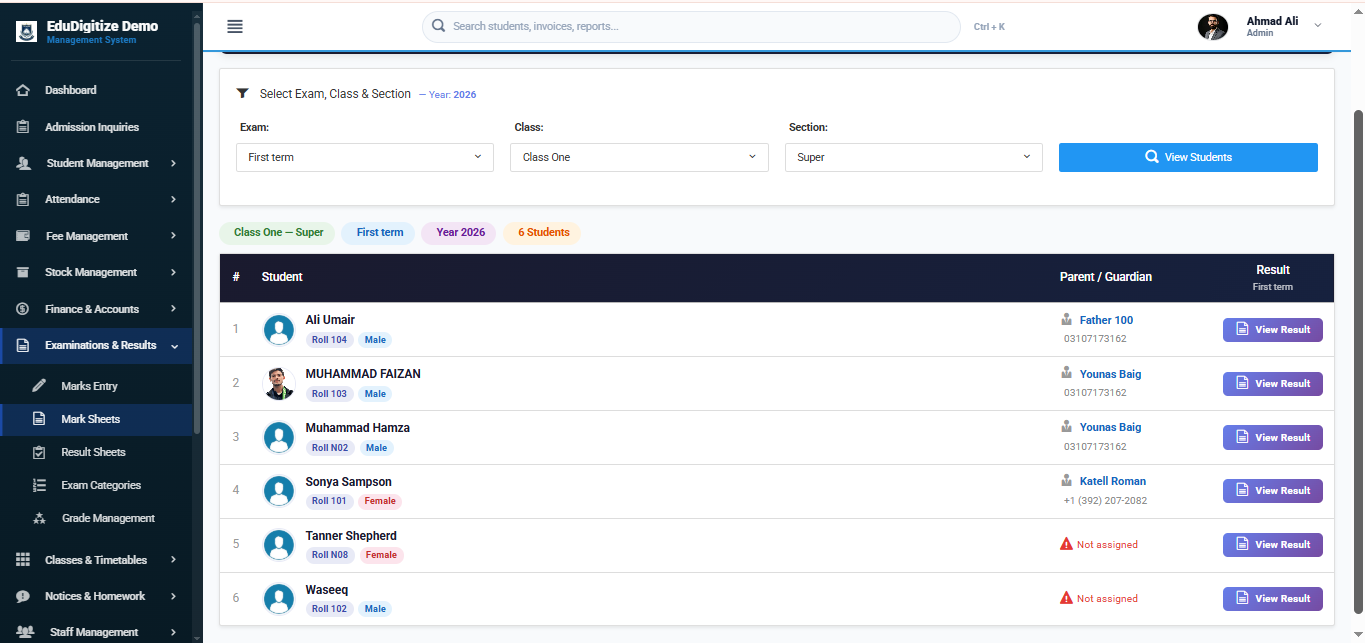
- Calculate grades and generate mark sheets
- Publish results to parent and student portals
- Print or share report cards
See it in the product
Key benefits
- Exam scheduling and subject mapping
- Marks entry with tabulation workflows
- Automated grade calculation and mark sheets
- CBC (Competency-Based Curriculum) report cards with competency-level grading, or standard percentage / GPA — chosen per class type
- PIN-protected student result access
- Parent result publishing via portal
Frequently asked questions
Yes. The report card can use a CBC competency-based layout instead of percentage / GPA, and schools can mix curricula by class type — for example CBC for pre-primary and junior classes and standard grading for others. Learning areas, competencies and grading are set in Academic Configuration.
Yes. Grading models are configurable — percentage, GPA / CGPA with credit hours, or CBC-style competency levels — so school, college and university workflows are all supported.
Yes. Results can be published to the parent and student portals, with PIN-protected result access.
Yes. Report cards and mark sheets can be printed or shared as PDF, and certificates can be generated from templates.